Changelog
See what's new with Whippy.
Added: Calendly Workflow Integration
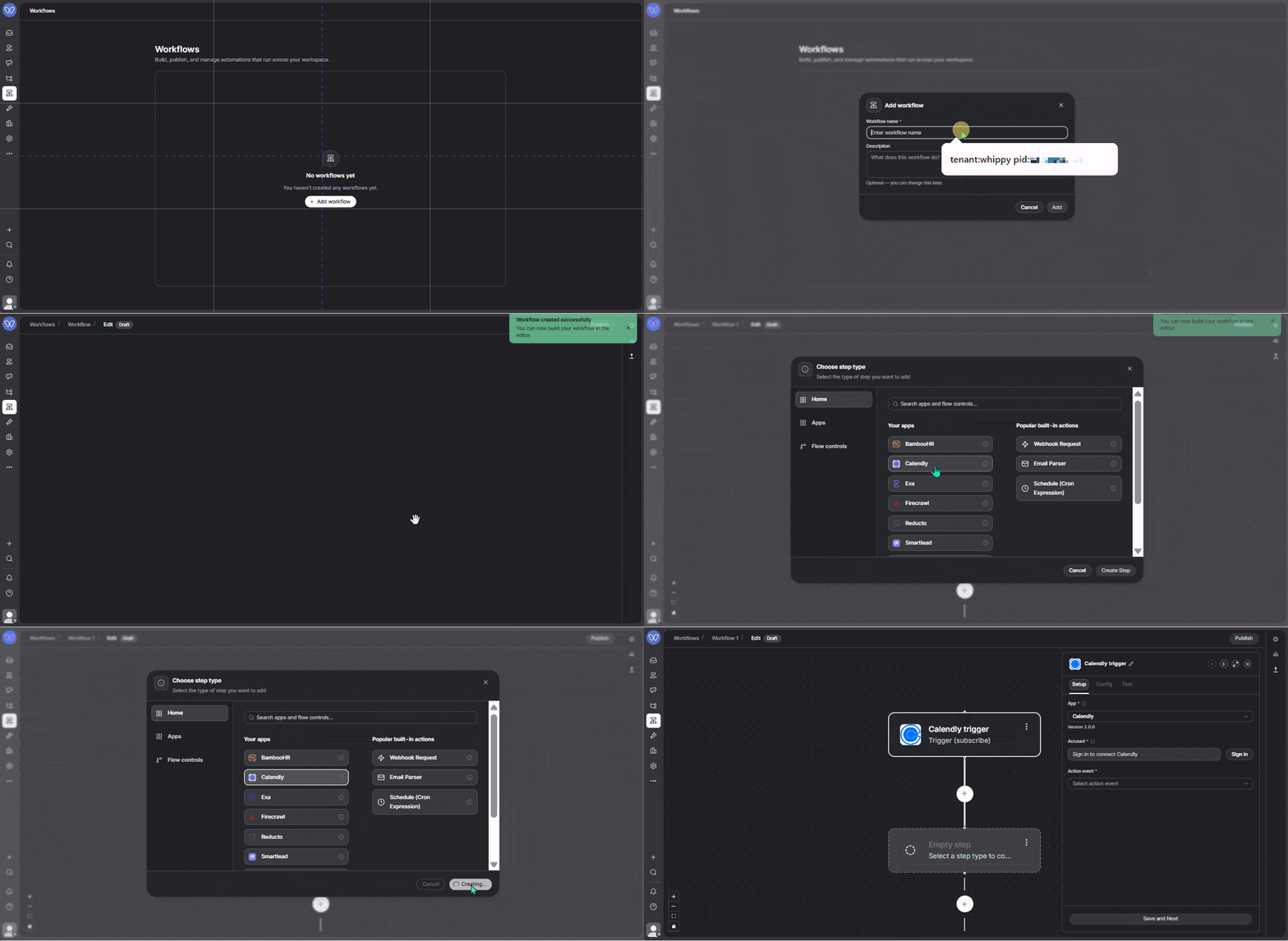
Whippy added a native Calendly app to its workflow builder, so teams can trigger automations the moment a meeting is booked or canceled and take action on Calendly data without leaving the workflow editor.
What's Included
Three real-time webhook triggers:
- Invitee Created: a prospect books a meeting
- Invitee Canceled: a booking is canceled
- Routing Form Submission Created: someone submits a Calendly routing form
Plus 56 additional steps to read, create, update, and delete Calendly data, including scheduled events, event types, invitees, availability, scheduling links, contacts, routing forms, webhooks, and more.
How It Works
When a trigger fires, the workflow has immediate access to the booking details. From there, it can enrich the contact, notify the team, update the CRM, or take any action available in Whippy Workflows.
Example: A prospect books a demo. The workflow enriches their profile via Apollo, sends that data to OpenAI to generate a short host prep note, and posts everything to Slack. The team sees who booked, when the call is, and context for the conversation before they ever open their calendar.
The same trigger can also update Whippy CRM, send an SMS or email, or chain additional Calendly steps like fetching event details or updating contact records.
Why It Matters
Acting on a Calendly booking used to mean checking an email notification, manually looking up the prospect, pinging the team, and writing prep notes. A process that worked fine until it got busy and steps got skipped.
This integration makes that entire sequence automatic and consistent, regardless of how full the day is.
Setup
- Go to Integrations → Calendly in your Whippy account
- Connect with a Calendly Personal Access Token
- Add a Calendly trigger or step to any workflow
- Publish. Webhook triggers register automatically.
Notes
- Webhook triggers require Calendly Paid Plan
- OAuth 2.1 support is planned for a future release
Improved: Faster Long-Timeframe Agents Reports
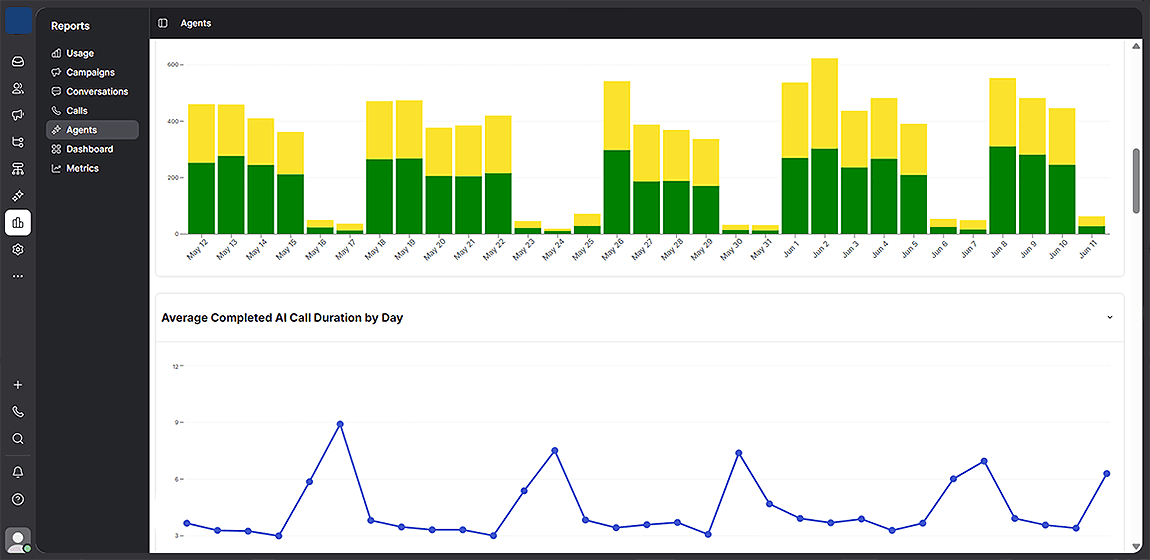
Agents reports over extended date ranges now load significantly faster, eliminating slow load times for ranges longer than 3 months.
What's Included
- Reduced load times for standard Agents reports under Reports > Agents
- Improved performance across any date range longer than 3 months, including custom ranges selected via the date picker
- No changes to report structure, data, or navigation. Same workflow, faster results
- Full backward compatibility: shorter timeframes are unaffected
How It Works
Open Reports > Agents and select any date range of 3 months or longer, including custom ranges up to a full year. The report loads promptly without stalling or timing out, regardless of how much AI call data your account has accumulated.
This applies to the built-in Agents reports only.
Why It Matters
Long-timeframe reporting on AI agent performance was previously unreliable for analysis workflows on large datasets. That made it impractical to track trends across quarters or identify seasonality patterns without significant waiting.
This update makes extended-range reporting reliable and on-demand. Teams can now pull a full year of agent performance data in the same time it previously took to load a single month, supporting faster decisions without workarounds.
As call history grows over time, report performance stays consistent rather than degrading.
Setup
No setup required. The improvement is applied automatically. There is nothing to configure or enable.
Notes
- Applies to standard Agents reports under Reports > Agents only
- Existing report filters, date pickers, and data remain unchanged
Changed: Improved Call Sync Accuracy to External Systems
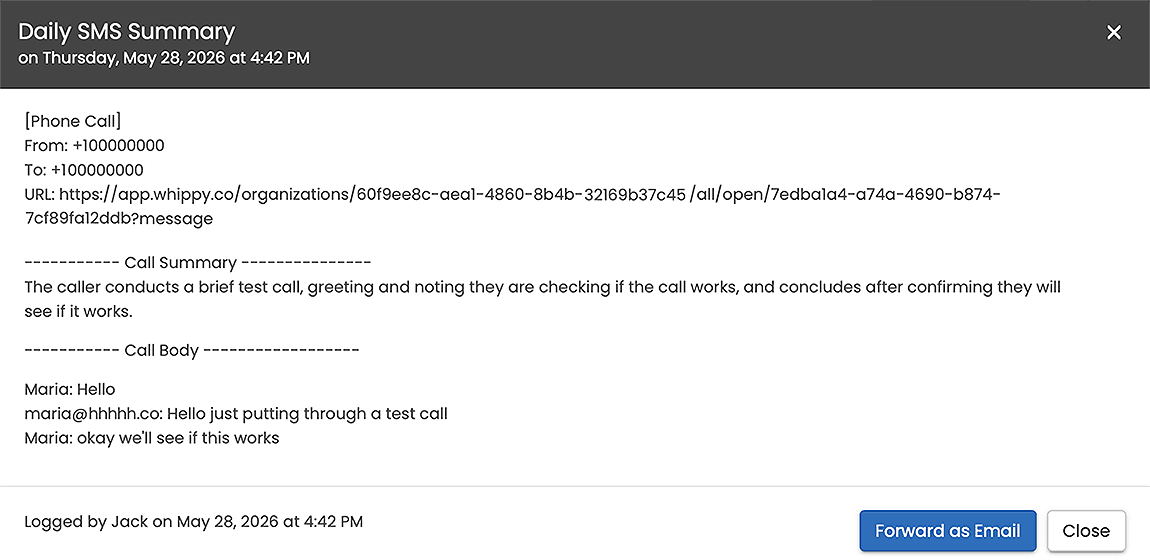
Call activity records now sync only after a call is fully completed, ensuring external systems always receive finalized data, including summaries, transcripts, and metadata.
What's Included
- Call delivery status validation added before syncing activity to the database
- Sync now triggers only on completed call states: call_completed and call_completed.agent_hangup
- Active or in-progress calls are excluded from the sync queue until completion
- Applies to all connected external integrations, including Avionté and Aqore
How It Works
Previously, Whippy pushed call activity records to external systems as soon as a call was logged, even while still in progress. Since call summaries, transcripts, and metadata are only generated after a call ends, external systems received incomplete records containing little more than a link back to the Whippy conversation.
Now, Whippy validates the call delivery status before saving or syncing any activity. A record only enters the sync database once the call reaches a completed state. At that point, the full record, including the call summary, transcript, and metadata, is available and synced in a single, complete entry.
Why It Matters
Incomplete call records create noise in external systems: missing context, placeholder links instead of summaries, and data inconsistencies that require manual cleanup.
This update ensures that every synced record is ready to use, with the full context your team and your integrations need to act on it. Whether you're tracking outreach activity in a staffing platform or logging calls in a CRM, the data that arrives is complete and accurate from the first sync.
Notes
- No configuration changes are required. The updated sync behavior is applied automatically.
- Calls that ended before this update was released are not retroactively resynced.
- If your integration previously relied on receiving in-progress call records, those will no longer appear until the call reaches a completed state.
Added: TempWorks Workflows Integration
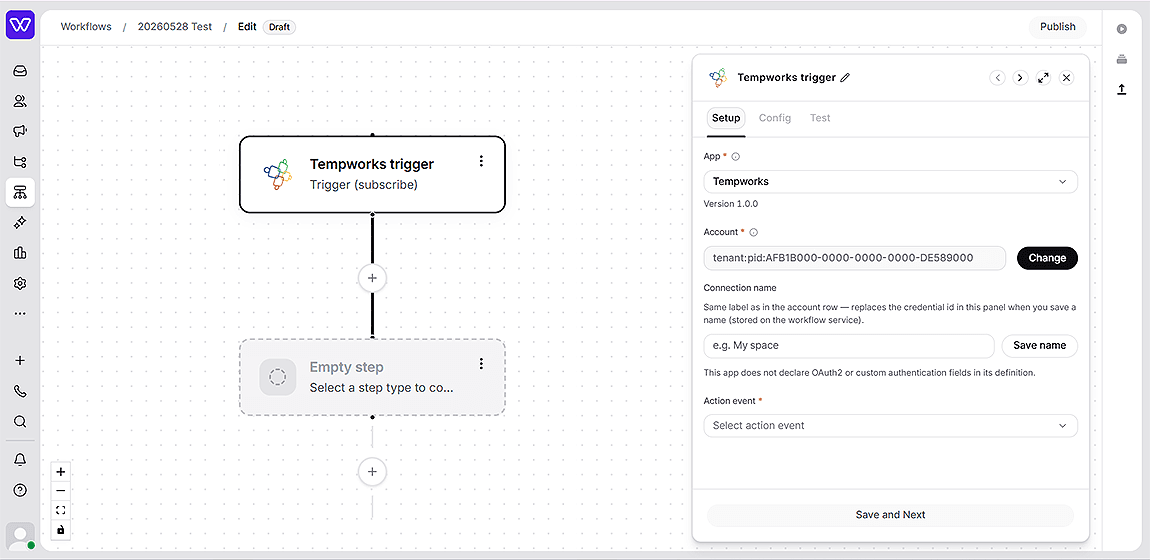
Whippy now connects directly to TempWorks from the workflow builder, letting staffing teams automate operations on live TempWorks data without custom middleware or manual HTTP requests.
What's included
- Search & lookup: Search employees, contacts, customers, job orders, and assignments using standard filters, and advanced search queries. Load datalists for branches, service reps, statuses, and more.
- Create & update records: Create and update employees, contacts, job orders, and assignments. Post messages, tasks, documents, candidates, onboarding steps, and financial records. Supports document and resume uploads.
- Webhook triggers: Subscribe to real-time TempWorks events including new employees, job order status changes, new contact messages, document uploads, custom property changes, and more.
How it works
The TempWorks app is available directly inside the Whippy workflow builder. Once connected, you can add TempWorks actions and triggers to any workflow the same way you would with any other app.
Authentication requires only your TempWorks tenant and product identifiers (ACR values). Your credentials are stored encrypted and exchanged for a secure access token on each request.
Example workflow: A workflow triggers when a new contact message arrives in TempWorks. A condition checks the message action type. If it matches Client inquiry, the workflow sends a follow-up email via Whippy messaging and updates the contact's status in TempWorks. If it doesn't match, the workflow ends with no side effects.
Why it matters
Staffing operations run on TempWorks. Until now, connecting those records to automated communication and downstream processes required custom-built middleware or one-off API calls.
This integration makes TempWorks a first-class part of Whippy workflows, so teams can build end-to-end automations that read, write, and react to TempWorks data in real time, without engineering overhead.
Setup
- Open the Whippy workflow builder and add a new workflow or edit an existing one.
- Search for TempWorks in the app list.
- Connect using your TempWorks ACR credentials (tenant:… / pid:…).
- Add TempWorks trigger or action steps to your workflow.
Notes
- The integration covers the TempWorks Open API and Webhooks API.
- Each customer authenticates with their own credentials. No shared access between accounts.